META Β· H2 2025

Β·

SUPPORTING WORK

ML Notification System

Notifications that drive decisions, not just inform

3.6x

faster issue resolution β€” approximately 18,400 engineer hours/year saved

22%

early termination of failing training jobs β€” $0.8M–$1.6M/year compute savings

20.5%

click-through rate β€” ~10x higher than comparable notifications at Meta

78.8%

active engagement with the notification system after launch

In early 2025 I joined a new team at Meta β€” model monitoring and alerting for ML systems β€” and within two weeks I was leading end-to-end design on what became one of the most-engaged notification features in Meta's ML infrastructure. The work shipped in H2 2025, achieved 3.6x faster issue resolution, 22% early termination of failing training jobs, and a click-through rate roughly 10x higher than comparable notifications across the company. Leadership recognized the project as a Performance Excellence win.

This case study is shorter than my Horizon Planner case study because the work is narrower β€” a focused feature rather than a multi-year product line β€” but the design decisions inside it are some of the most concrete I've made.

The problem

Meta runs an enormous number of machine learning training jobs every day. When something goes wrong with a model β€” slow convergence, divergence, data quality issues, infrastructure failures β€” engineers need to know about it quickly. The longer a problem goes undetected, the more compute is wasted on a broken run, and the more engineer time is wasted chasing the problem after the fact.

The legacy alerting system was based on dashboards. Engineers were expected to check their model health regularly, identify anomalies, and act on them. The system was technically capable of detecting problems but had no mechanism for surfacing them to the right person at the right time. In practice, most issues were found by engineers noticing degraded model outputs days after the underlying failure, by which point the wasted compute and lost training time were already significant.

The team had built a backend capable of detecting model issues in real time, but the surfacing problem β€” how to make engineers actually see, trust, and act on the alerts β€” was the design problem. That's what I was brought on to solve.

My role and constraints

I joined the team mid-half, two weeks before a planning deadline. The engineering work was further along than the design work; the team needed a designer who could ramp fast and ship in the same half. I led end-to-end design, partnering with two engineers and a PM.

Three constraints shaped the work:

Β·

Notification fatigue

Meta engineers receive hundreds of notifications per week. The threshold for 'useful enough to engage with' was already very high.

Β·

High-stakes decisions

A typical alert action is 'kill a training job' or 'investigate a data pipeline.' Both have real consequences β€” killing a job throws away hours of compute; ignoring a real issue wastes more compute.

Β·

Trust in the underlying detection

The backend's detection models would produce false positives. If engineers saw too many false alerts in their first weeks, they'd dismiss the entire system. Early-stage trust was the whole game.

FEATURED DESIGN DECISION

Connecting notifications to the decision flow

The core design decision was deceptively simple: don't make alerts inform; make alerts decide.

Most notification systems I'd seen at Meta and elsewhere followed an inform-then-redirect pattern. An alert says 'something might be wrong with model X' and provides a link to a dashboard where the engineer can investigate. That's two steps, both of which require the engineer to context-switch into investigation mode. Most engineers, faced with that two-step flow, would dismiss the alert and resolve to 'check it later' β€” which, in practice, meant never.

I designed the notification to surface enough decision-relevant information upfront that an engineer could act directly from the alert. Each notification included:

Β·

What the system detected, in plain language

Β·

Confidence level, so engineers could weight false-positive risk

Β·

The specific job, owner, and time window

Β·

Two action buttons in the notification itself: 'Terminate job' and 'Investigate'

The 'Terminate' action was the controversial design decision. Letting engineers kill a job from a notification β€” without first opening the model monitoring tool β€” meant that an engineer could act on a false positive and kill a perfectly healthy job. That was a real risk and the team debated it extensively.

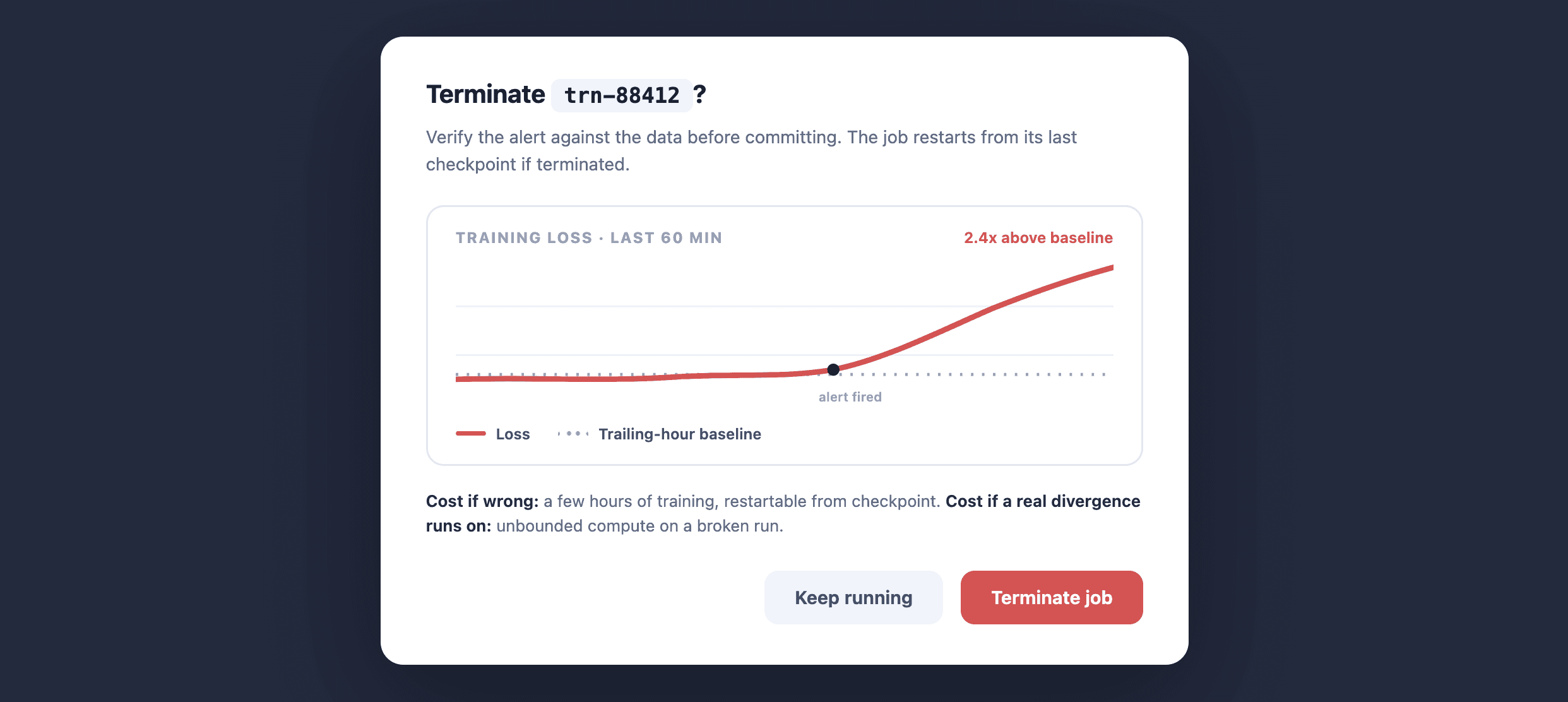
I argued for it on two grounds. First, the cost of a false-positive termination is bounded β€” at worst, you lose a few hours of training, which can be restarted. The cost of a false-negative non-termination is unbounded β€” a broken job can burn days of compute. The asymmetry favored making termination easy.

I argued for it on two grounds. First, the cost of a false-positive termination is bounded β€” at worst, you lose a few hours of training, which can be restarted. The cost of a false-negative non-termination is unbounded β€” a broken job can burn days of compute. The asymmetry favored making termination easy.

Second, requiring engineers to open a separate tool before acting would, in practice, mean they didn't act. The alerts would become decoration.

We shipped with terminate-from-notification enabled and a confirm dialog that showed the recent metric trend before commit. The metric trend in the confirm dialog was the trust-building affordance: engineers could verify the alert against the data in one glance before committing to the termination.

The 22% early termination rate after launch validated the design. Engineers were terminating jobs they wouldn't have terminated under the legacy system β€” not because they suddenly became more aggressive about cutting losses, but because the system surfaced the decision moment when it was actually decidable. What was important was that there was no increase help requests or complaints from ML Engineers that accidentally terminated their jobs.

What I learned

Notification design is decision-flow design.

I spent the first weeks of this project thinking I was designing a notification component. I was actually designing a decision flow that happened to start in a notification surface. The component-level work β€” typography, icon hierarchy, color states β€” was secondary to the flow-level work of figuring out where in the engineer's day the decision should happen.

Asymmetric cost analysis is a powerful design tool.

Whenever I'm faced with a design decision that involves trade-offs between false positives and false negatives β€” which is most decisions involving AI features and alerts β€” I now start by asking which kind of error is bounded and which isn't. The bounded error is usually the one you can afford to make more often.

For new teams, ramping fast is as much a design skill as designing well.

I had two weeks to onboard before a planning deadline. The way I got useful was to pair-pattern with the team β€” spending hours in their existing tools watching them work, instead of asking them to explain things to me in meetings. On any new team since, I've defaulted to this pattern: observe first, ask second.

Senior product designer for experts in complex domains. Β©2026 Maria Jimbo

Senior product designer for experts in complex domains. Β©2026 Maria Jimbo